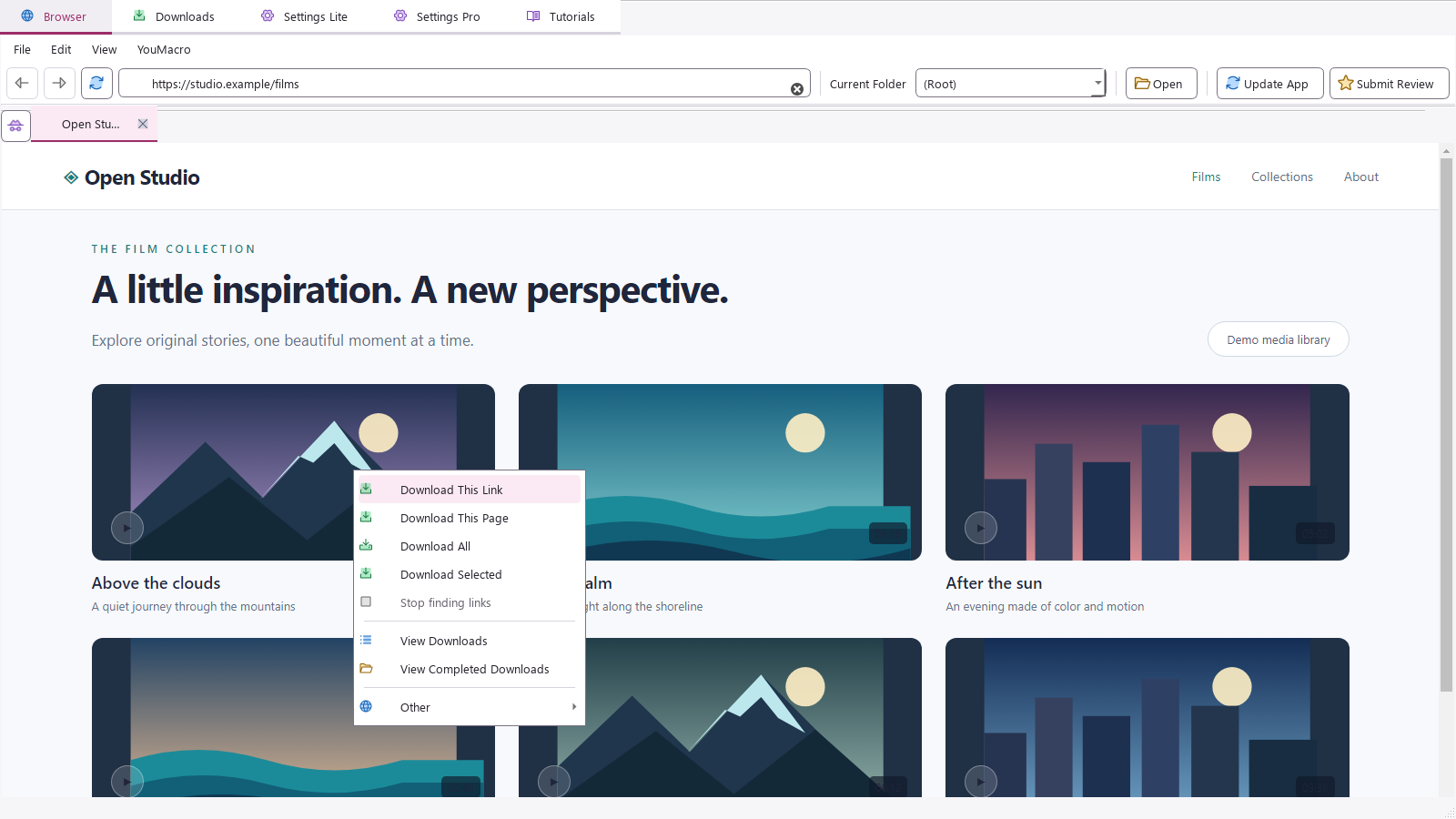
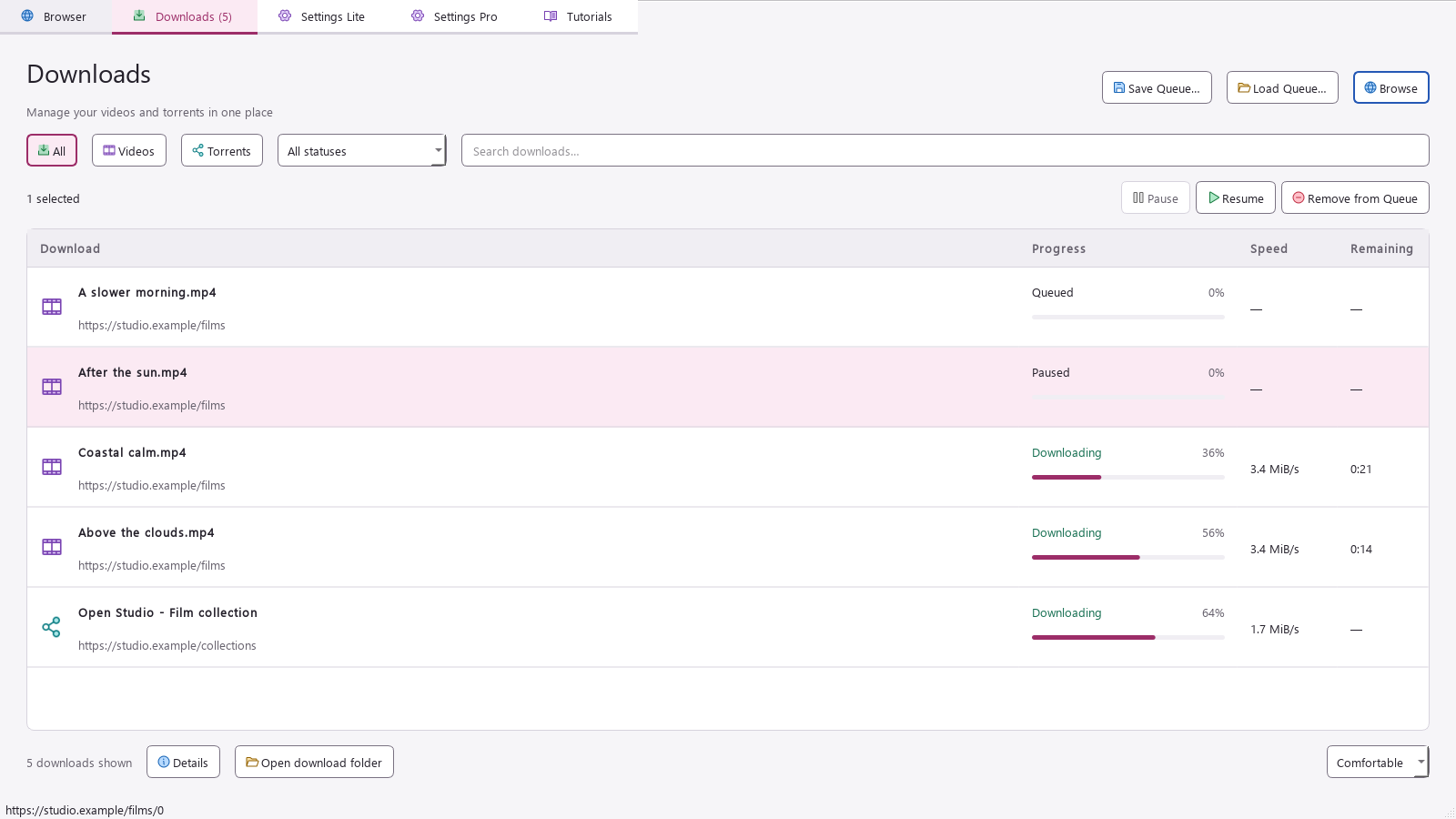
Follow a continuous walkthrough: download one video, a selection, and a whole page, then explore Downloads, Tutorials, and Settings.
The tour also previews the extra controls available with Pro.
JUMP TO
YouMacro Lite60 seconds · Narrated walkthrough
Single. Selected. All. See each one land in Downloads.Captions ↗
03 / A closer look
More downloads. Less busywork.
Search, pause, resume, and save your queue. Keep even a big batch easy to manage.
A right-click is all it takes.
Right-click a video link, highlight linked video titles, or use Download All to find video links across a supported page.
Original demonstration media library shown.
01 / 08
Side by side
Compare the download workflow.
Compare YouMacro with three established Windows apps with graphical interfaces: 4K Video Downloader Plus, JDownloader 2, and Internet Download Manager.
Swipe to compare ↔
Download workflows and simultaneous file downloads for YouMacro Pro and three alternative Windows downloaders with graphical interfaces.
Reviewed November 6, 2026. Features depend on the website, edition, and version. Parallel-download limits describe simultaneous files, not a speed benchmark or a guaranteed number of active transfers. Connections within one file are not separate downloads. A website will likely throttle downloads if all 999 come from the same domain. YouMacro’s page scan covers the current page; move to the next page to discover more.
4K Download’s current license comparison lists up to 7 simultaneous videos for Pro. JDownloader’s Domain Rules can exceed its global setting, subject to host and plugin limits. IDM’s concurrency setting applies to queued downloads, not transfers started manually. Its Site Grabber does not automate streaming-video capture; selecting direct file links differs from discovering videos inside web players.
Choose your download capacity
A few at once? Or hundreds?
Both editions download single videos, selected videos, and whole-page batches. Pro gives you more parallel capacity and output options.
THE EVERYDAY ESSENTIALS↳
YouMacro Lite
Everyday batch downloading, with up to 5 downloads running at once.
Download single, selected, or all videos
Run up to 5 simultaneous downloads
Choose your preferred resolution and theme
Customize shortcuts and explore built-in tutorials
These are concurrency limits, not speed guarantees. Actual concurrency and speed depend on your PC, connection, and the source websites. All 999 downloads from the same domain will likely be throttled by that website.
The need-to-knows
Good questions. Quick answers.
There’s more help inside the app. Open Tutorials whenever you need a hand.
How do Lite and Pro differ?+
Both editions include all three download modes, the browser, download queue, shortcuts, and tutorials. Lite runs up to 5 downloads at once. Pro lets you set up to 999 simultaneous downloads across different sites, choose your destination folder, save audio only, and include available subtitles and translations. A website will likely throttle downloads if all 999 come from the same domain.
Can I really download hundreds in parallel?+
Yes. YouMacro Pro accepts a simultaneous-download setting of up to 999 across different sites. If all 999 downloads come from the same domain, that website will likely throttle them. The number actually running depends on your PC, connection, available jobs, and source websites. YouMacro reduces new starts when a site throttles downloads. Lite supports up to 5 simultaneous downloads.
How do whole-page and selected downloads work?+
Download All discovers video links across the current page, including scrollable sections. Pagination or “load more” buttons may need your input. For a smaller batch, highlight the linked video titles you want and choose Download Selected. Available videos depend on the source website.
Where do I find my downloaded files?+
Use the Downloads tab to manage your queue and open completed downloads. In Pro, you can customize the destination directory in Settings Pro.
Does every website work?+
YouMacro supports many video and social websites. Availability depends on the site and the content. Use it to download content you own or have permission to save.